WIRED COVERAGE
Ethernet backhaul explained: what it changes before you buy mesh
Desk research · Published 2026-10-17 · Updated 2026-10-17 · No hands-on product testing
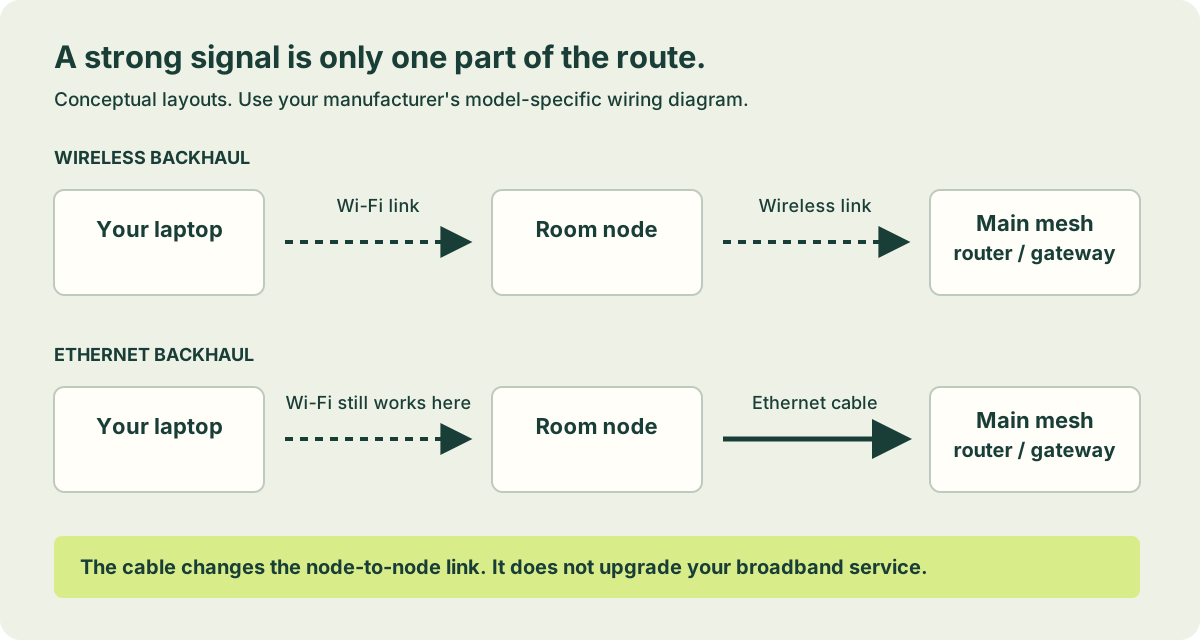
Ethernet backhaul means using a cable for the connection between network nodes. Your laptop or phone can still use Wi-Fi in the room. The cable changes one part of the route, rather than turning the entire home into a wired network.
Follow one journey
Imagine a laptop upstairs connecting to a nearby mesh node. That node still needs to pass traffic towards the router and broadband connection. With wireless backhaul, that part uses a radio link. With Ethernet backhaul, a cable carries that part. This distinction explains why adding a node beside a desk may improve the displayed signal without fixing a poor upstream path.
Compare an access point too
If your goal is Wi-Fi in one fixed room and you already have a suitable cable route, a wired access point may be another approach to investigate. Mesh can be useful when you want one coordinated system across several locations, but a mesh pack is not automatically necessary for every wired room. For a stationary desktop or television, a direct device connection can be a useful first experiment.
Confirm the operating mode
Keeping a provider router may be important for a telephone or other service. A compatible mesh can sometimes operate in access-point mode behind it. Features vary: TP-Link’s documentation lists functions that change in Deco access-point mode. Check the exact model’s current instructions rather than assuming that a feature shown in a router-mode advert remains available in every mode.
A buying checklist
- Does the exact model and regional revision support Ethernet backhaul?
- What does the manufacturer show for cabling in your chosen operating mode?
- Are there enough ports for the upstream link and your fixed devices?
- Would you also need a switch, patch leads or installation?
- Which features need an account or a paid subscription?
- Is current firmware and security support available?
Know the boundary
A cable between indoor nodes does not improve the broadband service entering the home. Nor is a home Ethernet layout automatically an appropriate link between separate buildings. Ask a qualified installer to assess that route; do not extend an indoor diagram into a garden without checking installation and electrical considerations.
Next action: draw the intended router-to-node path, check the manufacturer’s mode-specific diagram and compare the complete equipment cost. Then use the equipment reference to investigate examples rather than treating them as tested recommendations.
Sources and limits
Original explanation and editorial judgement. Manufacturer features vary by model and revision. No prices or range guarantees are verified.